AI Sales CRM for B2B teams

Find. Qualify. Reach out. Close.

Acvire turns target segments into qualified B2B customer lists and runs the full sales flow in one system: research, enrichment, AI outreach, follow-ups, deals, and automation.

Mobile apps in preparation iOS and Android are coming soon.

Keep tasks, replies, calendars, and follow-ups in view while you are on the move.

iOS Android
  • Target accounts from AI, registries, maps, CSV, and API
  • Reviewed AI drafts instead of uncontrolled black-box sending
  • Pipeline, follow-ups, and automation inside the same project
Acvire Sales OS
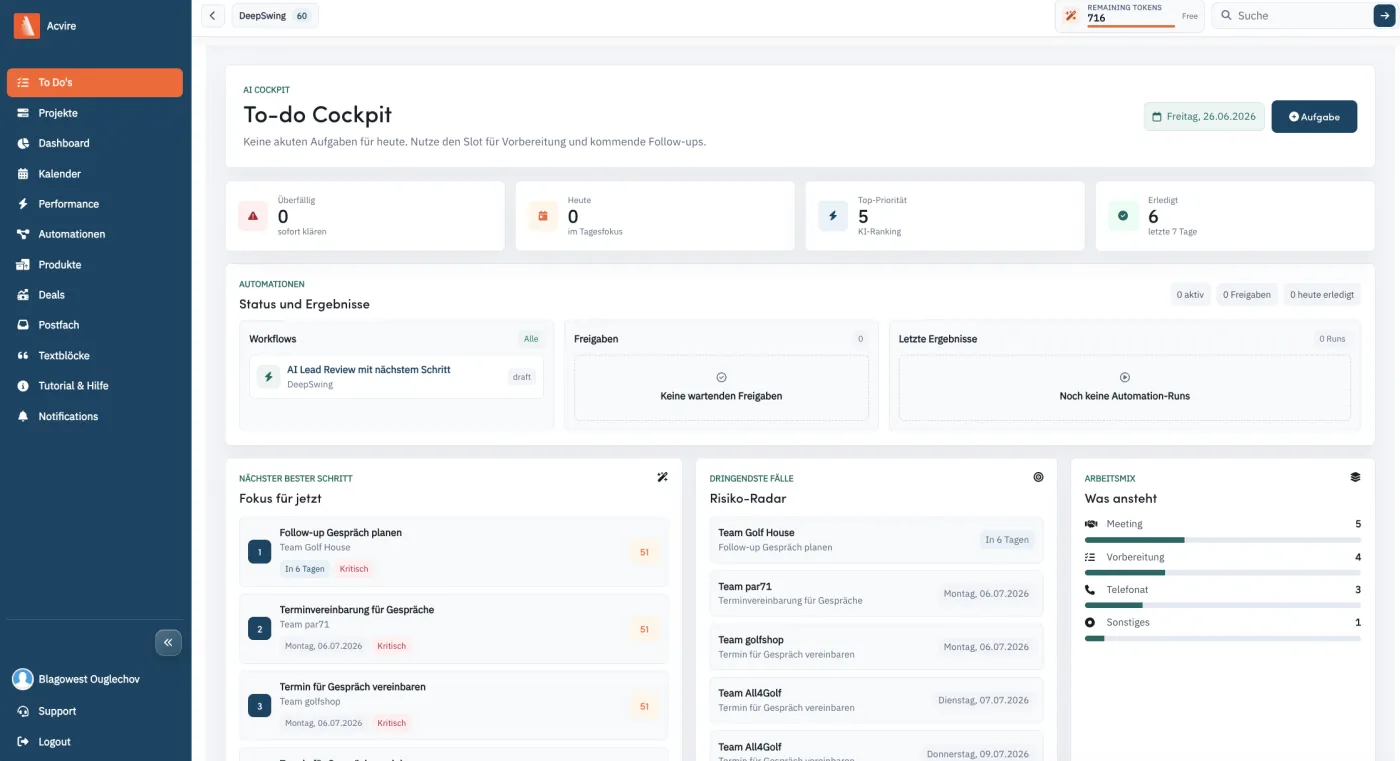
Acvire Sales OS on desktop - to-do cockpit with AI prioritization
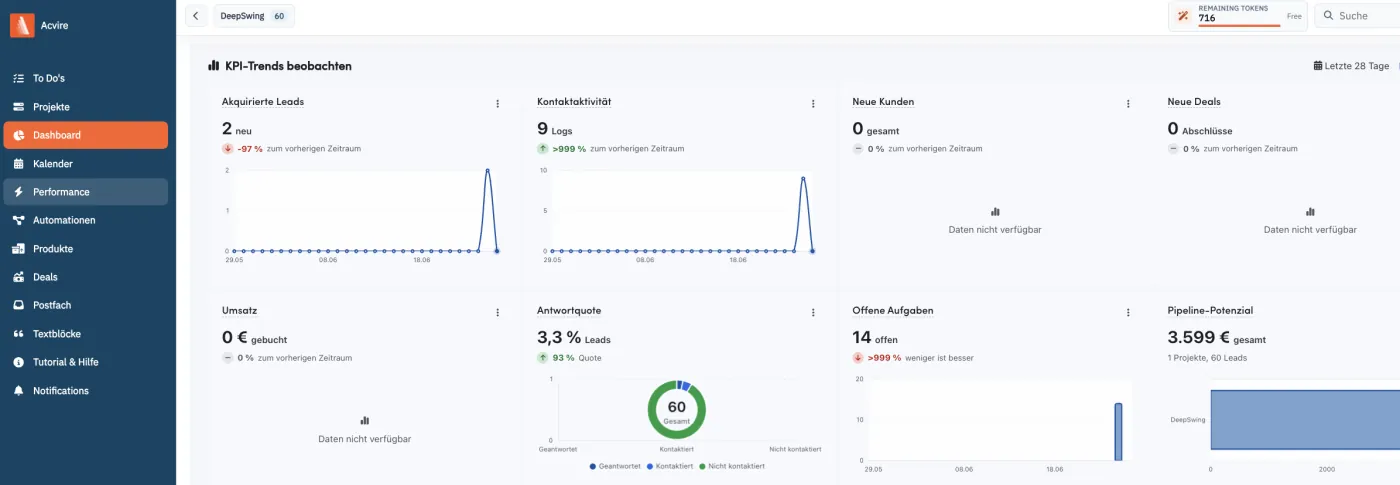
Acvire dashboard with pipeline and forecast on tablet
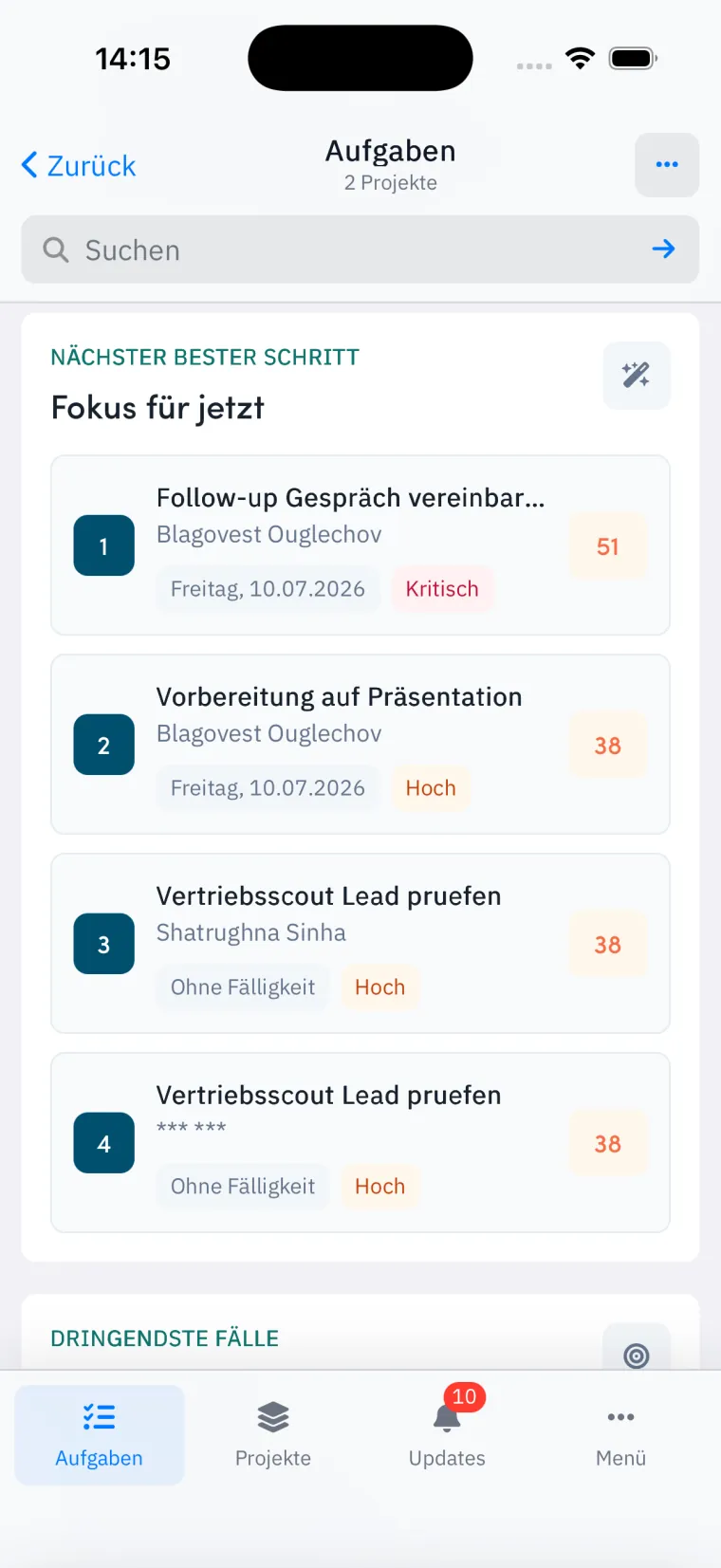
Acvire app - tasks on iPhone

More than pipeline CRM

One system for the complete B2B sales motion.

Traditional CRMs manage contacts. Acvire builds the target account base, checks data, creates usable outreach, and keeps next steps moving operationally.

Acquisition starts before the contact.

The sales scout, AI lead search, and map search find companies before they ever enter a pipeline.

AI stays reviewable.

Drafts, research, and automation stay visible, versioned, and protected by approvals when risk is involved.

Everything stays in project context.

Leads, companies, deals, tasks, mail accounts, calendars, dashboards, and audit logs share the same workspace.

Why Acvire?

Not another CRM. A system that starts before the pipeline.

Many sales tools optimize existing contacts and deals. Acvire looks further forward: find target accounts, validate data, prepare outreach, and control every next step cleanly.

Classic CRM
Typical approach

Often starts only after contacts already exist.

Acvire approach

Acvire actively builds the target account base: AI lead search, registry data, maps, CSV, and API become a qualified project list.

Pipeline only
Typical approach

Shows where deals stand, but not always which companies should be contacted in the first place.

Acvire approach

Acvire connects company research, lead scoring, contact paths, deal value, and the next action in one workflow.

AI without control
Typical approach

Automation can quickly turn into black-box sending or unclear data changes.

Acvire approach

Acvire works with drafts, campaign review, AI usage, workflow limits, audit logs, and approval gates.

Tool stack
Typical approach

Lead sources, mail, calendar, tasks, deals, and reporting often live in separate systems.

Acvire approach

Acvire keeps projects, teams, mailboxes, calendars, contact logs, products, deals, dashboards, and automation together.

Use Cases

For teams that want predictable acquisition.

Acvire is strongest when sales teams need to do more than manage contacts: systematically find the right companies and carry them through to deals.

Target accounts, pipeline, forecast

B2B sales

Find new segments, build target account lists, review outreach, and follow up on deals consistently.

Map, AI mail, review

Agencies & consulting

Research regional or industry-specific audiences and prepare personalized outbound campaigns.

ICP, enrichment, API

SaaS & tech

Turn ICP descriptions into company lists, research decision makers, and prepare automated follow-ups.

Radius, calls, calendar

Field sales

Find companies within a radius and connect route and contact logic with tasks and calendar.

From feature to feature

The sales journey Acvire automates.

Every feature is built for the next step: find fitting companies, verify relevant data, reach out personally, follow up, manage deals, and automate repeatable workflows.

01 Target accounts

Target segments become concrete companies.

Describe an industry, region, or market. Acvire combines AI lead search, registry data, map search, CSV import, and API access so an idea immediately becomes an editable target account list.

  • AI recommends matching segments, keywords, and codes
  • Search by city, legal form, capital, radius, and type
  • Deduplication and direct transfer into projects
Target accounts
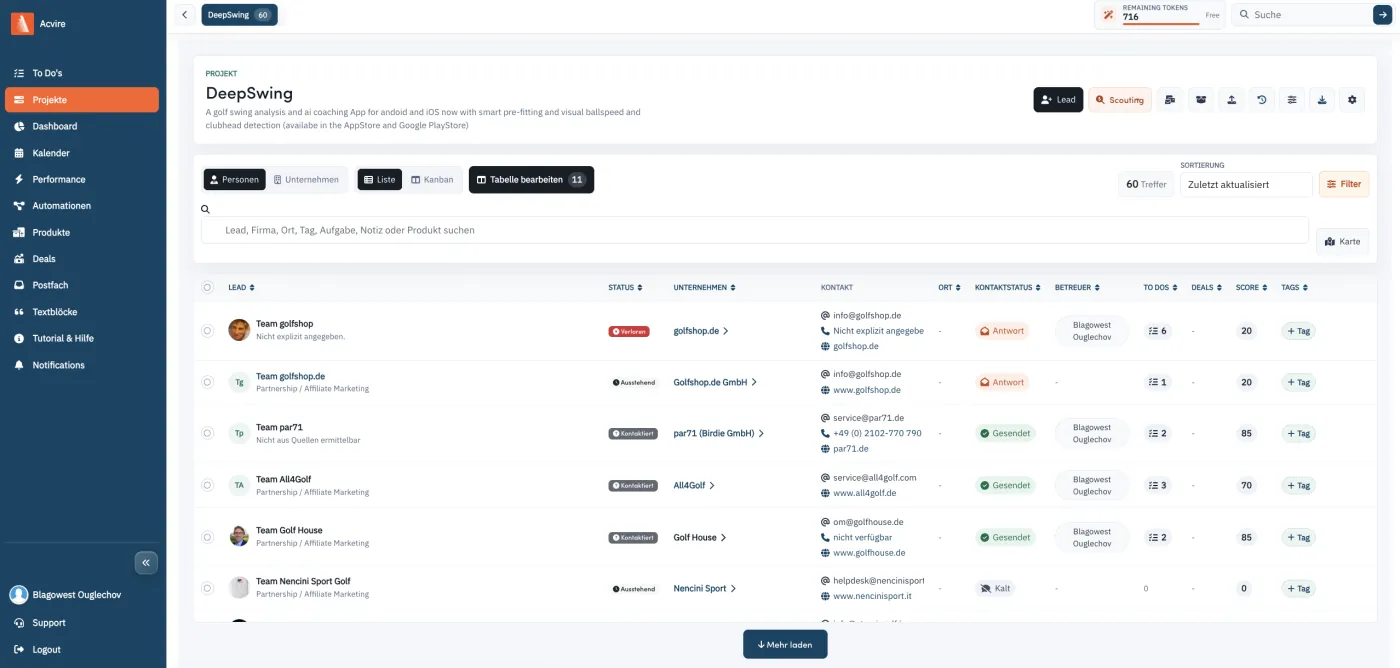
Acvire lead and company table with discovered target accounts
02 Enrichment

Data becomes usable, not just collected.

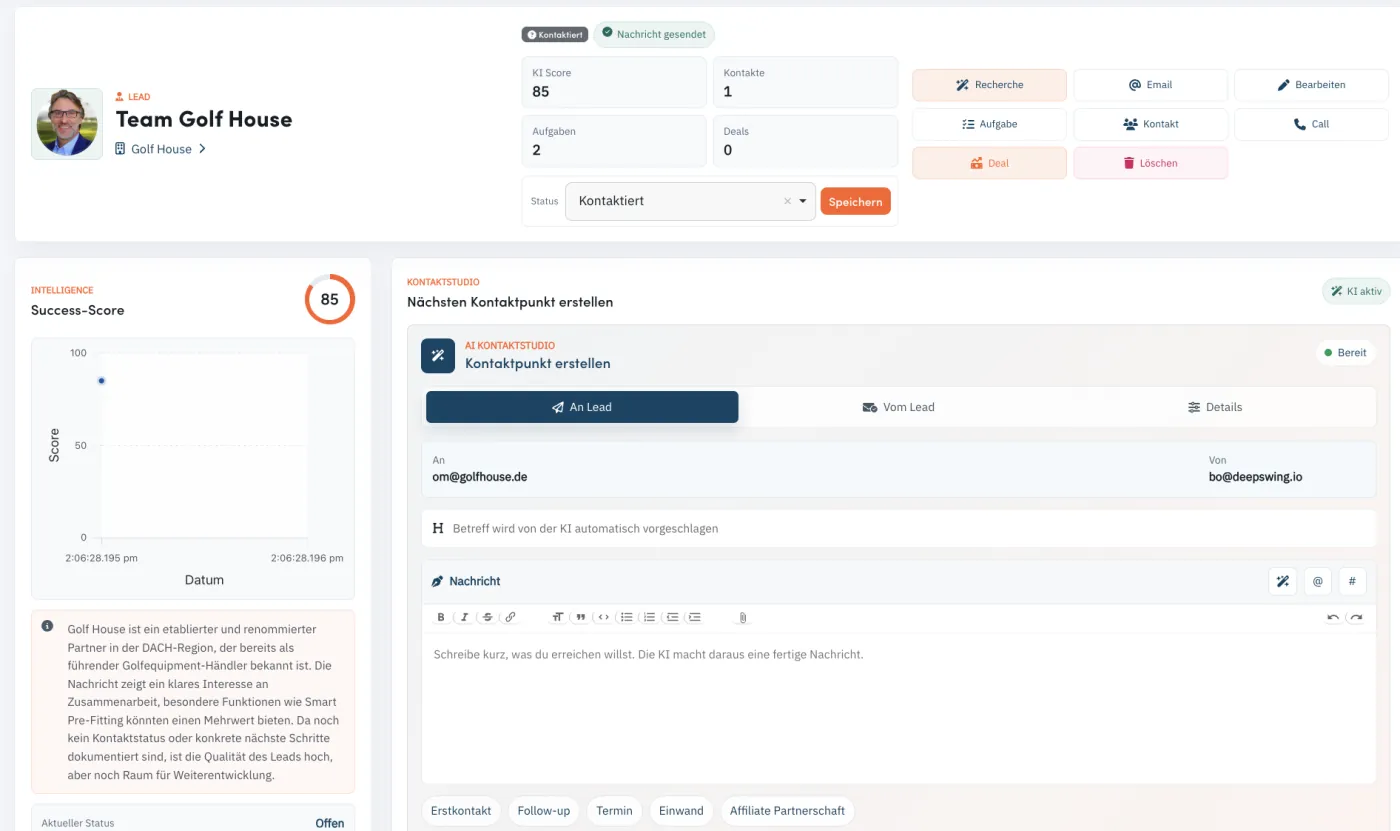
Lead and company data is researched, enriched, and stored in CRM context: website, phone, address, industry, description, images, and contact paths stay on the right record.

  • Lead and company research with source scoring
  • Email finder and email verification
  • Progress, job status, and AI usage by feature
Enrichment
Acvire lead detail with success score and enriched contact data
03 Outreach

AI writes, humans approve.

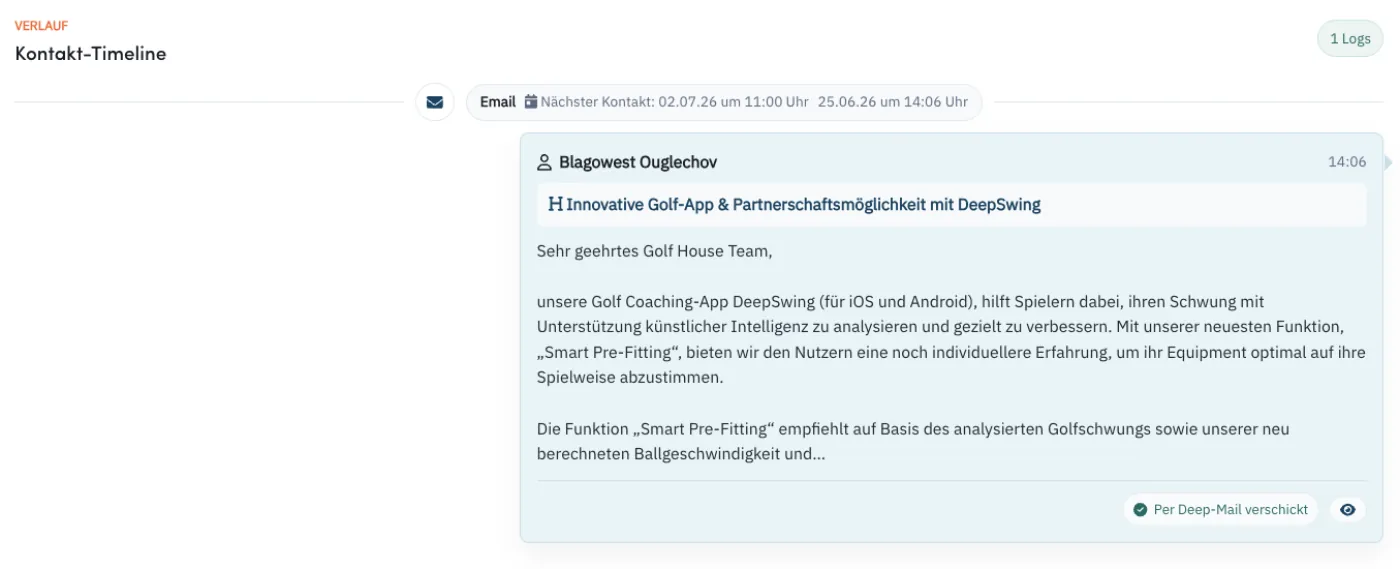
Acvire creates personalized subject lines, HTML emails, and campaign drafts from lead, project, and conversation context. Text modules and variables keep communication consistent.

  • AI email drafts directly on the lead
  • Campaign review before sending
  • Text modules with lead and sender data
Outreach
Acvire contact timeline with reviewed AI email
04 Follow-ups

No next step gets lost.

Mailbox, contact logs, tasks, calls, and calendars work together. Incoming replies are assigned to leads, next contacts are planned, and teams stay in sync through notifications.

  • Inbox, Sent, and All with lead assignment
  • Tasks, calls, contact logs, and calendar events
  • Google and Microsoft mail plus calendar sync
Follow-ups
Acvire to-do cockpit with next best steps
05 Deals

Pipeline, revenue, and customers come together.

Deals, products, discounts, taxes, and customer status are managed inside the same project. Lists, Kanban rules, and dashboards show where revenue is created and where it stalls.

  • Deal stages with automatic lead status
  • Kanban rules for leads and companies
  • Dashboards, forecasts, and CSV export
Deals
Acvire dashboard with pipeline, revenue, and forecast
06 Automation

Automation runs sales steps safely.

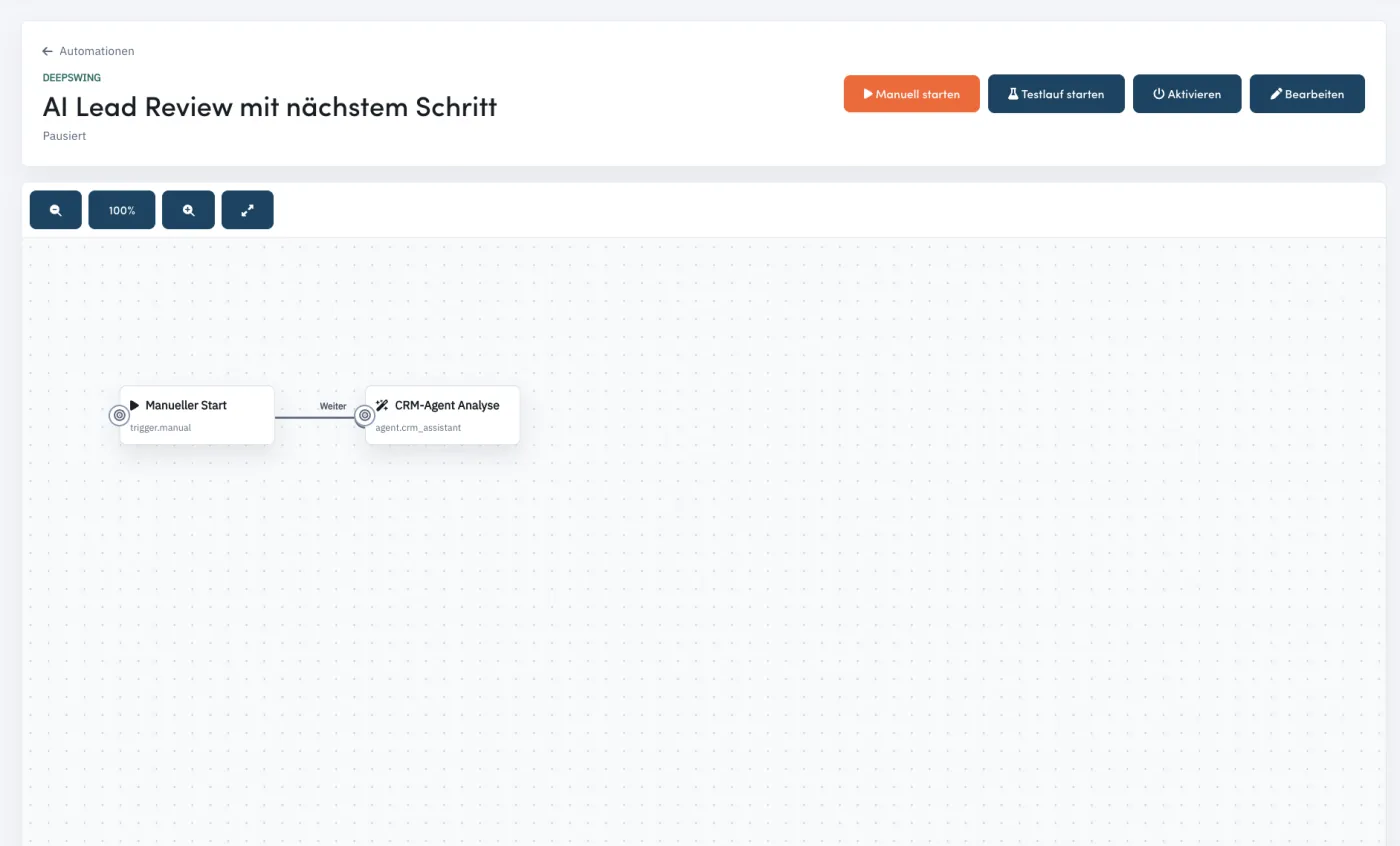
Graph-based workflows connect triggers, conditions, actions, and agents. Critical steps such as email sending run with approval gates instead of uncontrolled background execution.

  • Sales scout, AI lead review, and pipeline reminder
  • Limits for runs, records, and AI requests
  • Approvals for risky actions
Automation
Acvire automation flow with trigger and CRM agent

Feature foundation

Everything a sales team needs every day.

The landing page condenses the knowledge base into clear product promises without hiding the real breadth of the product.

Project workspace

Projects bring together leads, companies, deals, tasks, products, mail accounts, team roles, automation, and reports.

Smart search & views

Full-text search, status, tags, region, score, open to-dos, and deal value filter person and company perspectives.

Kanban with rules

Columns can be controlled by status, contact status, tags, owner, score, industry, or open tasks.

Mail connections

SMTP, Microsoft Mail, and Google Mail are connected per project member and used for sending and inbox work.

Campaign review

AI campaigns can be reviewed, adjusted, and documented with contact logs for each lead before sending.

Dashboards & forecast

Overview, Today, Performance, and Forecast show leads, customers, revenue, contact logs, tasks, and reply status.

Calendar & meetings

Day, week, month, agenda, ICS, Google Calendar, and Microsoft Calendar views are integrated.

Roles & audit logs

Admins, members, and viewers work with project access, team control, and traceable audit logs.

API & integrations

Token-based API endpoints for leads and enrichment connect Acvire with external processes.

AI usage control

AI usage is tracked by feature, project, and source, with free and billable shares separated.

Support chat

Users start tickets as chats, admins take them over deliberately, and replies are reported by email.

Security

Devise, roles, encrypted sensitive lead and mail data, blind indexes, and access through project memberships.

Automation with control

A CRM agent that prepares, prioritizes, and protects.

The autonomous CRM agent analyzes lead and CRM context, suggests next steps, creates drafts, and can prepare follow-up tasks. Critical modules remain controllable through risk levels, limits, and approvals.

Test the sales agent

Triggers

Lead created Email received Task due Deal status changed Schedule

Conditions

Check status Check tag Check date AI classification AND/OR

Actions

Create task Enrich lead Find email Update deal Request approval

Data, integrations, and control

More content in the system, fewer breaks in sales work.

Acvire brings data sources, communication, calendars, tasks, and security logic into the same project context. A list becomes a controllable sales process.

Target account data

AI lead search, registry search, map search, CSV imports, and API endpoints bring new companies into projects.

Communication

SMTP, Google Mail, Microsoft Mail, Inbox, Sent, parser webhooks, and contact logs keep replies in lead context.

Calendar & tasks

Google Calendar, Microsoft Calendar, ICS, tasks, calls, and agenda views control the next steps.

Control & security

Project roles, encrypted fields, audit logs, AI usage, workflow limits, and approvals secure operations.

For real sales work

Built for teams that do not want to maintain yet another tool.

5,000 CSV rows per import with preview, mapping, and issue list
50 Default limit for automation runs per day as a safety frame
25 new records per sales scout run with deduplication
3 project roles: admin, member, and viewer

Ready for the next sales flow?

Start with target accounts, not an empty pipeline.

Try Acvire and bring lead search, enrichment, AI outreach, follow-ups, deals, and automation together in one system.

FAQ

Short answers.

Is Acvire only a CRM?

No. Acvire is an AI-powered sales system: target account search, data enrichment, communication, follow-ups, deals, automation, reporting, and usage control run in one interface.

Can Acvire find new target accounts?

Yes. Teams can describe target groups with AI, search registry data, find companies through map and radius search, import CSV lists, and save matches directly as leads.

How do existing lists get into Acvire?

CSV imports support preview, field mapping, issue lists, and up to 5,000 rows per import. Duplicate records are detected before they are added to projects.

What happens during data enrichment?

Acvire adds company and lead information such as website, address, phone, industry, description, contact paths, images, and email data, while keeping progress visible for each research job.

Can Acvire find and verify email addresses?

Yes. Email finder and email verification are part of the lead flow. Results are stored on the lead and can be used for campaigns, contact logs, and follow-ups.

Are AI emails sent automatically?

Acvire creates reviewed drafts and can prepare automation. Risky actions such as sending are protected by approval concepts in the automation system by default.

Which mail and calendar providers are supported?

Project members can connect SMTP, Microsoft Mail, or Google Mail. Calendars can sync through Google and Microsoft and can be provided as ICS.

How are follow-ups organized?

Inbox, Sent folders, contact logs, calls, tasks, and calendar events work together. Incoming replies can be assigned to leads and next steps remain in project context.

Can the team manage deals and revenue?

Yes. Deals, stages, products, discounts, taxes, customer status, Kanban rules, forecasts, and dashboards live in the same workspace as leads and communication.

How does the system stay controllable?

Roles, project access, audit logs, AI usage events, workflow limits, and approvals let teams use automation without losing transparency.

Is there an API?

Yes. Token-based API endpoints connect external processes with leads and enrichment features, so teams do not need to move data manually.

Which teams is Acvire built for?

Acvire fits B2B teams that want to systematically find, validate, contact, and convert target accounts without spreading lead search, CRM, mail, calendar, and automation across many tools.